The best camera to monitor an elderly parent for most families is the eufy Security Indoor Cam E220 2-camera kit, because a pan and tilt camera in the living room and another in the kitchen or bedroom hallway covers the rooms where falls and wandering usually happen, and two-way audio lets you check in without driving over.
This guide ranks six indoor cameras by what matters to a caregiver rather than a homeowner: how easily your parent can live with it, whether you can talk through it, whether night vision is good enough to see a hallway at 3 a.m., and whether it works without a monthly fee. A camera does not replace a visit or a medical alert system, and it works best when your parent knows about it and agrees to it. The privacy section below explains how to bring it up.
Cameras at a Glance
| Camera | Budget | Video | Two-way talk | Best for |
|---|---|---|---|---|
| eufy Security Indoor Cam E220 (2-Camera Kit) | Mid-range | 2K | Yes | Covering two rooms |
| eufy Security 4K Indoor Camera E30 | Mid-range | 4K | Yes | Sharpest picture |
| Google Nest Cam Indoor (Wired, 3rd Gen) | Mid-range | 2K HDR | Yes | Google Home users |
| Ring Pan-Tilt Indoor Cam | Budget to mid-range | HD | Yes | Ring or Alexa users |
| Tapo 2K Pan Tilt Security Camera (C210P2) | Budget | 2K | Yes | A single room on a budget |
| WYZE Cam Pan v3 | Budget | 1080p | Yes | The tightest budget |
Two rooms to cover? Start with the eufy E220 2-camera kit. One room only? The Ring Pan-Tilt or the Tapo C210P2 cost far less. Want the sharpest picture and no required subscription? The eufy E30 stores video on a memory card.
How we chose these cameras
We looked for indoor cameras that are in stock on Amazon, that are made by established brands and that work through a phone app a non-technical family member can handle. Details come from the manufacturer listings on Amazon and from published specifications, not from lab testing. We favored cameras with pan and tilt, because one fixed camera in a living room often misses the chair, the doorway and the hall at the same time, and we favored cameras with two-way audio so a worried adult child can speak instead of calling a phone that may not be answered.
What a camera can and cannot do for a parent living alone
A camera tells you that something has happened or that a routine has changed. A parent who has not left the bedroom by late morning, a stove light that stays on, or an unfamiliar visitor at the door are all things you can see in seconds. What a camera cannot do is call for help on its own. If a fall is your main concern, pair it with a wearable alert; see our best medical alert systems guide, and for wandering, see the best GPS trackers for dementia.
The 6 Best Cameras to Monitor an Elderly Parent
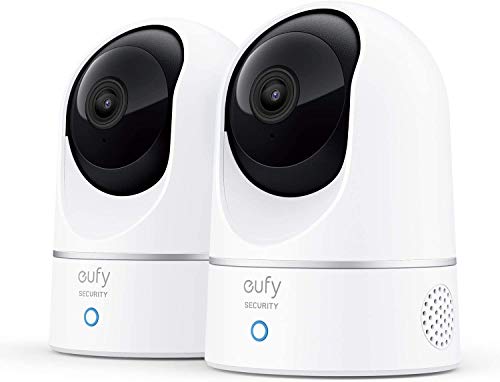
The eufy E220 two-camera kit gives you two pan and tilt cameras in one order. According to the listing, each camera records in up to 2K and uses on-device AI to decide whether a person or pet is present, so you get alerts that matter instead of a notification for every shadow. When motion is detected the camera locks on and follows it, and the pan and tilt motor covers a full 360 degrees.
For a parent who lives alone, two cameras is the sensible starting number: one in the main living area and one in the kitchen or the hall that leads to the bathroom. Two-way audio lets you say hello without a phone call, and it works with Alexa and Google Assistant if your parent already uses a smart speaker.
Pros
- Two cameras for the price of a single premium model
- Pan, tilt and auto tracking cover a whole room
- AI detection cuts false alerts
- Two-way audio
Cons
- 2K rather than 4K
- Setup needs a Wi-Fi connection at your parent's home

The eufy E30 records in 4K, which matters when you want to read a pill label or tell whether a spill on the floor is water. The listing describes AI detection for people, pets and audio cues, smart auto tracking, and color night vision with a built-in spotlight that can switch to infrared.
It stores footage locally on an SD card that is sold separately, and eufy states that full functionality is available without monthly fees. For families who do not want another subscription, that is the deciding feature. The spotlight is useful in a hallway but can be bright, so test it before leaving it in a bedroom.
Pros
- 4K picture
- Local storage with no required monthly fee
- Color night vision
- Works with Alexa, Google and HomeKit
Cons
- SD card sold separately
- Spotlight can be too bright for a bedroom

The third-generation Nest Cam Indoor records 2K HDR video and sits in the Google Home app alongside any other Google devices. The listing highlights encrypted video, two-step verification through your Google Account, and a green LED light that shows when the camera is on, which is helpful for being open with a parent about when they are being watched.
Some of the smarter features, such as searchable event summaries, require a Google Home Premium subscription, so budget for that if you want them. The basic live view and alerts work without it, but check the current feature split before you buy. It is a wired, fixed camera, so you need an outlet near the spot you choose.
Pros
- Sharp 2K HDR picture
- Strong account security
- A status light that shows when it is on
- Clean app if you already use Google Home
Cons
- Fixed camera, no pan or tilt
- Advanced features need a subscription

The Ring Pan-Tilt Indoor Cam pans 360 degrees and tilts up and down in the Ring app, with live view, two-way talk and HD video with color night vision. It is an easy, plug-in installation.
It is the natural pick if you or your parent already use Ring doorbells or Echo devices, because everything lives in one app. Ring offers optional paid plans for recorded video history, so the cost of a live-view-only setup is the camera itself, and the cost of recorded clips is a subscription.
Pros
- Pan and tilt at a modest price
- Simple plug-in setup
- Works with the Ring and Alexa ecosystem
- Two-way talk
Cons
- Recording history requires a paid plan
- HD rather than 2K or 4K

The Tapo C210P2 is a 2K pan and tilt camera with a 360 degree horizontal range and a 114 degree vertical range. The listing describes motion, person and baby-crying detection notifications with no additional fee, two-way audio with a built-in siren, and night vision up to 30 feet.
It is the pick for a parent who needs one room watched and a family that wants to spend as little as possible. The app is more basic than the big-name options, but live view and two-way talk work well enough that you can check in on a morning or evening routine.
Pros
- 2K video at a low cost
- Pan and tilt
- Motion and person alerts with no added fee
- Two-way audio and siren
Cons
- Less polished app
- No multi-camera kit bundle

The WYZE Cam Pan v3 is the lowest-cost camera here. It pans, tilts and zooms, offers color night vision, two-way talk with enhanced audio, custom motion zones, and microSD storage up to 512 GB. The listing says it can send alerts when it hears a smoke or carbon monoxide alarm, which is a useful extra for a parent who lives alone.
It is built to be used indoors or outdoors, so it handles a porch or garage too. You give up some picture quality compared with the 2K and 4K models, but at this price you can afford one for each main living area.
Pros
- Very low cost
- Pan, tilt and zoom
- Local storage option
- Alerts for smoke and CO alarm sounds
Cons
- 1080p picture
- Basic app features compared with premium brands
Placement: where to put cameras for a senior living alone
Start with the places where risk is highest. The main living area shows the chair, the walker and the path to the front door. The kitchen shows the stove and whether meals are happening. The hall to the bathroom is where many falls happen at night, and a camera with good night vision there tells you quickly if something is wrong. Mount cameras above head height or on a stable shelf, point them at the room rather than at a bed or toilet, and avoid bathrooms and bedrooms where your parent changes clothes.
Privacy, consent and talking to your parent
The most important step is the conversation. Explain what the camera sees, who can view it, when it will be on, and why you want it, and offer a switch or a cover your parent controls. Agreement from a parent with capacity is both respectful and, in many places, legally important, particularly when audio is recorded. Rules about recording audio and about cameras in private spaces differ by state, so check yours before you install. If your parent has dementia, involve their doctor and any legal decision-maker in the decision. Our guide on handling a difficult elderly parent has scripts for hard conversations.
Setup tips that save a trip
Ship the camera to your own home first, set up the app and test the Wi-Fi connection, then bring it to your parent preconfigured. Label the power cable and the camera so a helper can reconnect it after an outage. Set alerts for activity at unusual hours rather than for every movement, or the notifications will become noise. If your parent has no internet service, consider a camera that uses a cellular hub or check whether adding Wi-Fi is easier than any other change.
Frequently Asked Questions
For most families, a pan and tilt indoor camera with two-way audio and person detection, such as the eufy E220 two-camera kit, covers the most ground for the least cost. For the sharpest picture without a required subscription, the eufy E30 is the better choice.
Not always. Several cameras here support local storage on a memory card, and live view is free. Cloud video history and smart summaries are usually a paid add-on, so check what you want before buying.
Generally you need your parent's knowledge and agreement, and audio recording is regulated more strictly than video in many states. Avoid private spaces like bathrooms and bedrooms where someone changes clothes, and check your state's rules.
Yes. Every camera in this guide has two-way audio. A parent with hearing loss may need the volume raised, and some seniors find the voice from a camera confusing, so test it together.
Not on its own. Some cameras detect a person and motion, but they do not call for help. Pair a camera with a medical alert or a fall detection wearable.
Put it where it covers the living area, the kitchen and the hallway to the bathroom. Keep it out of bathrooms and out of bedrooms where your parent dresses.