The best tablet for most seniors is the Apple iPad 11-inch (A16): it has the simplest interface to learn, the largest app selection, accessibility features built in, and the easiest video calling with family who use iPhones. If your parent is already an Android user or you want to spend less, the Samsung Galaxy Tab A9+ is the best lower-cost choice.
A tablet is often the first piece of technology that gives an older parent something they genuinely use: video calls with grandchildren, photos from the family, large-print reading, a pill reminder, telehealth visits and a way to hear their favorite music or shows. This guide compares six tablets on the things that matter for a first-time user, namely screen size, how easy the system is to learn, battery, sound and cost. Prices change often, so the budget tiers below are relative; check the current price before you decide.
Tablets at a Glance
| Tablet | Budget | Screen | System | Best for |
|---|---|---|---|---|
| Apple iPad 11-inch (A16, 128GB) | Premium | 11 inch | iPadOS | Ease of use and video calls |
| Samsung Galaxy Tab A11+ (128GB) | Upper mid-range | 11 inch | Android | Android families |
| Samsung Galaxy Tab A9+ (11-inch, 64GB) | Mid-range | 11 inch | Android | Big screen for less |
| Amazon Fire HD 10 Tablet | Budget to mid-range | 10.1 inch | Fire OS | Streaming, reading, Alexa |
| Lenovo Tab One (8.7-inch) | Mid-range | 8.7 inch | Android | Small hands, reading in bed |
| Amazon Fire HD 8 Tablet | Budget | 8 inch | Fire OS | Lowest cost start |
Want the least confusion and the best video calls? iPad. Want a big screen for less? Galaxy Tab A9+. Want the cheapest way to start? Fire HD 10 or Fire HD 8. Want a lighter tablet for a small hand? Lenovo Tab One.
How we chose these tablets
We picked tablets that are in stock on Amazon, from companies that provide regular software updates and whose apps include the video calling, email, photo and reading tools seniors ask for. Details come from the manufacturer listings and published specifications. We did not lab test them. Instead we looked at four practical questions a caregiver has to answer: Will my parent be able to learn it? Is the screen big enough to read comfortably? Will the sound be clear enough for a video call? And what will it cost if it is dropped?
What to look for in a tablet for an older adult
Screen size matters most. A screen of 10 inches or more gives larger text and bigger touch targets, which helps with arthritis, tremor and low vision. Weight matters too: anything over a pound feels heavy after twenty minutes of holding, so plan on a case with a stand. Look for a front camera and good speakers for video calls, and a system that lets you enlarge text, increase contrast and set up speaking features. Finally, make sure you can manage it from afar. Both Apple and Google let family members help with updates and sharing.
The 6 Best Tablets for Seniors

The 11-inch iPad is a straightforward recommendation. The listing describes the A16 chip, an 11-inch Liquid Retina display, 128GB of storage, Wi-Fi 6, 12MP front and rear cameras and USB-C charging. In practice what matters to a senior is that it stays fast for years, the screen is large and bright, and the front camera is good for FaceTime calls with relatives.
The accessibility settings are the real selling point: you can enlarge text, enable bold text and increase contrast, turn on speaking selection so the tablet reads text aloud, and use Guided Access to lock the tablet to one app for a parent who gets confused. If your family uses iPhones, messages and FaceTime calls go straight through. It is the most expensive tablet in this guide, so a case with a stand is a smart addition.
Pros
- Simple, consistent interface
- Strong accessibility features, including reading text aloud
- Excellent video calls with iPhone users
- Long software support
Cons
- Highest price
- Needs a case to survive drops

The Galaxy Tab A11+ has an 11-inch screen with a refresh rate up to 90Hz, quad speakers, 6GB of RAM, 128GB of storage and a memory card slot for more. The listing also notes Google Gemini features that can help with everyday tasks.
It is the Android answer to the iPad for families who already use Samsung or Google phones. The large screen and quad speakers help with video calls and for watching programs, and the expandable storage means thousands of family photos can fit. Android lets you enlarge the display size and font and offers a simple "Easy" mode on many Samsung devices.
Pros
- Large 11-inch screen
- Loud, clear quad speakers
- Expandable storage
- Works well with Android and Google accounts
Cons
- More settings than an iPad to manage
- Higher cost than the A9+
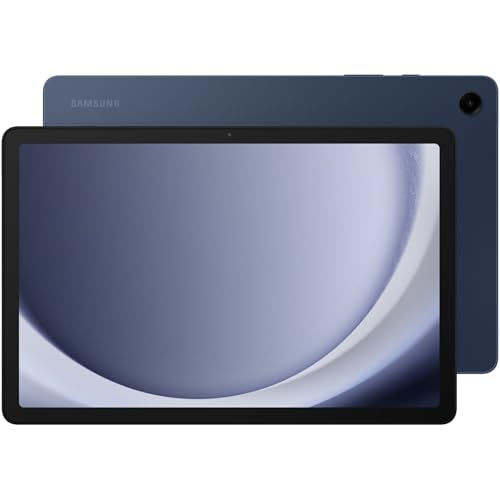
The Galaxy Tab A9+ is an 11-inch Android tablet with up to a 90Hz refresh rate and quad speakers powered by Dolby Atmos, according to the listing. Samsung quotes an average battery life of about 8 hours.
For a parent who wants a big screen for reading, shows and calls but does not need the fastest processor, this is the best balance. It can run two apps side by side, which is handy when a family member is helping on a video call while a recipe or a form is open. Add a case with a built-in stand to make it easy to prop up on a table.
Pros
- Big screen at a mid-range cost
- Good speakers for calls and shows
- Multi-window for helping on a call
- Reasonable battery life
Cons
- Slower than the iPad
- 64GB fills up with photos

The Fire HD 10 has a 10.1-inch 1080p display, an octa-core processor, 3 or 4GB of RAM, and a battery Amazon rates at up to 13 hours. The listing says it is 25 percent faster than the previous generation and includes a 5MP front camera for video calls.
It is the best choice for a parent whose main uses are streaming, Kindle reading and Alexa. The home screen is simple, and Amazon content is front and center. The trade-off is that Fire tablets use Amazon's app store rather than the full Google Play Store, so some apps your parent's clinic or bank uses may be missing. Check the apps you need before you buy.
Pros
- Large screen at a modest cost
- Long battery life
- Easy Amazon streaming and reading
- Alexa built in
Cons
- Fewer apps than iPad or Android
- Some telehealth and banking apps may be missing

The Lenovo Tab One has an 8.7-inch HD display, weighs less than a pound, and comes with a folio case that has a built-in stand. Lenovo rates it at up to 12.5 hours of unplugged YouTube streaming, and the listing describes 4GB of memory.
This is a good tablet for a parent with a smaller hand or for reading in bed, because it is light enough to hold with one hand. The smaller screen means smaller text, so use the font size controls. The included case with a stand is a practical bonus.
Pros
- Light enough to hold for long reading sessions
- Case and stand included
- Long battery life
- Android app selection
Cons
- Smaller screen than the 10 and 11-inch options
- Lower resolution than the larger tablets

The Fire HD 8 is the lowest-cost way to try a tablet. The listing describes an 8-inch HD display, 4GB of memory, 64GB of storage and Alexa built in.
It is a good tablet for a trial: if your parent does not take to it, you have not spent much. It is small and light, so it is easy to use on a nightstand for audiobooks, Kindle reading and video calls with a relative. If it does catch on, you can step up to a larger tablet later and keep this one in the bedroom.
Pros
- Lowest cost
- Light and easy to carry
- Alexa for voice requests
- Good for books and audiobooks
Cons
- Small screen for text
- Amazon app store only
Set up the tablet before you hand it over
Spend an hour on setup and the tablet will get used. Sign in with a family-managed account, add family contacts to video calling, and put the four or five apps your parent will actually use on the first screen. Increase the text size and display zoom, turn on screen reader or speaking features if reading is hard, and turn off app notifications that are not helpful. Write the Wi-Fi password and the account sign-in on a card and keep a copy. If your parent has memory loss, consider using the single-app lock mode available on iPad and Android so the tablet opens only to a video call or a photo slideshow.
Add a case, a stand and a stylus
A tablet that falls on a hard floor can crack. A rugged case with a stand protects it and props it up for video calls so a parent does not need to hold it. A larger-grip stylus helps parents with tremor tap more accurately. Our dementia activities products guide lists other low-tech alternatives if screens are not a good fit.
Use a tablet for caregiving, not just entertainment
A tablet makes a good family hub. You can share a calendar for appointments, put a pill list on the home screen next to our pill organizer picks, join telehealth appointments, and use video calls to check in. If you are the main caregiver, the free checklists in our Caregiver Toolkit are easy to open on a tablet during a doctor visit.
Frequently Asked Questions
For most seniors the iPad is the easiest because the interface is consistent and the accessibility settings are strong. If your parent is used to Android, a Samsung Galaxy Tab is a good alternative.
10 to 11 inches is the sweet spot for text size and touch targets. An 8-inch tablet is lighter and cheaper, but the text is smaller.
Most do not. A Wi-Fi tablet works at home. If your parent has no home internet, you can set up a phone hotspot or choose a cellular model, but check the monthly cost.
They are good for streaming, reading and Alexa, and they cost less. They lack the full Google Play Store, so check that the apps your parent needs are available.
Yes. Apple Family Sharing and Google Family Link let you handle some settings and approvals. For urgent help, a screen-sharing video call lets you see the screen and walk them through a task.
Limit the home screen to a few apps, use single-app lock modes, set the tablet to start a photo slideshow or music, and keep it on a charging stand in a consistent place.