A medical alert system can be the difference between a fall becoming a minor incident or a life-threatening situation. With so many options available, from basic pendants to smartwatches with fall detection, choosing the right system for your parent can be overwhelming. Here's everything you need to know.
One in four adults over 65 falls each year. Those who can't get up or call for help have dramatically worse outcomes. A medical alert system provides peace of mind for both your parent and you, help is always one button press away.
Types of Medical Alert Systems
Home-Based (Landline)
Base unit connects to landline; pendant/wristband works within home. Most affordable but limited to home use.
- Range: 400-1000 ft from base
- Requires landline phone
- Two-way voice through base unit
- No GPS capability
Home-Based (Cellular)
Same as landline version but uses cellular network. No landline required.
- Range: 400-1000 ft from base
- Works without landline
- Two-way voice through base unit
- Backup battery (usually 24-72 hrs)
Mobile/GPS Systems
Fully portable device with cellular and GPS. Works anywhere, home, shopping, driving.
- GPS location tracking
- Two-way voice in device
- Needs charging (1-7 days)
- Best for active seniors
Smartwatch Systems
Apple Watch or specialized medical alert watch. Looks like normal watch, full mobile functionality.
- Fall detection (auto-alerts)
- Heart rate monitoring
- GPS tracking
- Daily charging required
As an Amazon Associate, we earn from qualifying purchases.
Top-Rated Medical Alert Products
 Medical Guardian Mobile Alert System GPS tracking, fall detection, and 24/7 monitoring for home and on-the-go
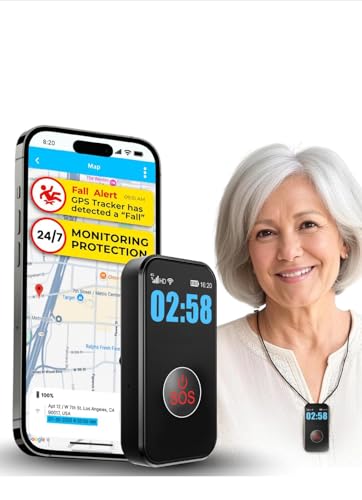 Medical Alert Pendant with Fall Detection Waterproof pendant automatically detects falls and calls for help
 Lunderg Bed Assist Rail with Motion Light Alerts caregivers when parent gets out of bed at night
 Motion Sensor Night Lights (6-Pack) Automatically illuminates paths to prevent nighttime falls
Key Features to Consider
Fall Detection
Automatically alerts monitoring center when a fall is detected. Critical if your parent might be unconscious after falling. Adds $5-10/month.
Two-Way Voice
Speak directly through the device. Essential feature, allows operators to assess the situation and provide reassurance.
GPS Tracking
Locate your parent in an emergency. Important for those with dementia or anyone who leaves the house. Only in mobile devices.
Water Resistance
Can be worn in shower, where many falls happen. Most are water-resistant; verify level (splashes vs submersion).
Battery Life
Mobile devices need charging. Range from daily (smartwatches) to 5+ days. Consider if parent will remember to charge.
Caregiver App
View location, battery status, and get alerts on your phone. Very helpful for monitoring remotely.
Monitoring Options
Professional 24/7 Monitoring
Most systems include professional monitoring:
- Trained operators answer alerts 24/7/365
- Can dispatch EMS, call your emergency contacts, or just check in
- Have medical info on file (conditions, medications, allergies)
- Some speak multiple languages
- Response time matters, look for 30 seconds or less
Self-Monitoring
Some systems allow alerts to go directly to family members:
- Lower cost (no monitoring fees)
- Good if family is always available
- Risk: what if no one answers?
- Often used as backup to professional monitoring
Family self-monitoring seems like a good idea until you're in a meeting, on a plane, or asleep at 3 AM. Professional monitoring ensures someone always responds within seconds. The monthly cost is worth the peace of mind.
Choosing the Right System
For Mostly-at-Home Seniors
If your parent rarely leaves home:
- Home-based system is sufficient and most affordable
- Get waterproof pendant/wristband for shower use
- Fall detection highly recommended
- Cellular version if no landline
For Active Seniors
If your parent drives, shops, walks, or travels:
- Mobile GPS system is essential
- Consider smartwatch for less "medical" appearance
- Check cellular coverage in their area
- Battery life matters, longer is better
For Seniors with Dementia
Special considerations:
- GPS tracking is critical: for wandering
- Automatic fall detection (they may not push button)
- Lockable wristband so they can't remove it
- Caregiver app to check location anytime
- Some offer "safe zone" alerts if they leave an area
The best system is useless if not worn. Choose a style they'll accept. Smartwatches look normal. Pendants can be worn under clothing. Wristbands may be preferred over pendants. Let them choose the style. Emphasize independence, not surveillance.
Costs and Contracts
What to Expect
- Equipment: $0-200 (often free with contract or returned at end)
- Activation: $0-100 (avoid if possible)
- Monthly monitoring: $20-50 depending on features
- Fall detection add-on: $5-10/month extra
Contract Tips
- Avoid long contracts: Situations change; month-to-month or short terms are better
- 30-day trial: Many offer money-back trials, essential to test compatibility
- Cancellation policy: What happens if parent moves to facility or passes away?
- Price lock: Will monthly rate increase?
- Hidden fees: Activation, equipment, cancellation fees?
Comparison: Popular Systems
| Feature | Basic Home | Mobile GPS | Smartwatch |
|---|---|---|---|
| Works away from home | No | Yes | Yes |
| Fall detection available | Yes | Yes | Yes |
| GPS location | No | Yes | Yes |
| Water resistant | Usually | Usually | Most |
| Requires charging | No | Every 1-7 days | Daily |
| Looks medical | Yes | Somewhat | No |
| Monthly cost | $20-30 | $35-50 | $30-50 |
Installation and Testing
Setting Up
- Most systems are plug-and-play; no professional installation needed
- Test the device immediately after setup
- Test in all areas of the home (especially shower, bedroom, yard)
- Program emergency contacts and medical information
- Ensure your parent understands how to use it
Ongoing Testing
- Test monthly, most companies recommend it and can schedule reminders
- Check battery status regularly for mobile devices
- Update emergency contacts and medical info as needed
- Replace equipment if damaged or not working properly
What Happens When the Button Is Pressed
- Alert goes to monitoring center (typically within 10-30 seconds)
- Operator speaks through device: "This is [Name] from [Company]. Do you need help?"
- If verbal response: Operator assesses and dispatches appropriate help or contacts family
- If no response: Operator typically calls emergency contacts, then dispatches EMS
- GPS systems: Location is transmitted so responders know where to go
- Information on file (medications, conditions) is shared with first responders
Accidental button presses happen. Good monitoring centers handle them gracefully, just tell them it's a false alarm. This is far better than hesitation to press the button in a real emergency. Never scold your parent for false alarms.
Get the Complete Safety Checklist
Medical alert systems are just one part of keeping your parent safe at home. Get our full home safety guide and emergency planning resources.
Explore Caregiver Resources